
Protect your privacy by hiding your geographic location from websites. Add random "noise" to your real location for enhanced security.
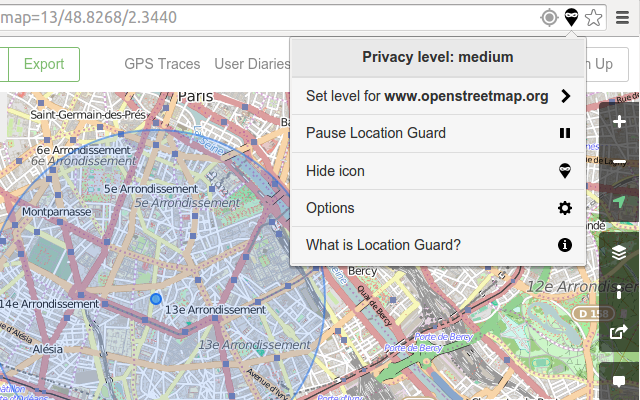
Join 100,000+ users who trust Location Guard V3
Protect your privacy with intelligent location masking technology
When a website asks for your location, Location Guard intercepts the request before your real coordinates are shared.
The extension adds carefully calculated "noise" to your actual location, making it impossible to determine your exact position.
The website receives a modified location that's close enough for functionality but protects your exact whereabouts.
Location Guard protects against JavaScript-based geolocation (high accuracy), NOT IP-based geolocation (low accuracy). If a website detects your coarse location from your IP address, use a VPN instead. Location Guard is not designed to solve IP-based tracking.
Everything you need to protect your location privacy
Prevents websites from tracking your exact location while still allowing location-based services to function.
Choose from multiple privacy levels to balance between privacy protection and location accuracy.
Set a specific fixed location instead of adding noise to your real one for consistent results.
Configure different privacy levels for different websites based on your trust and needs.
Fully transparent code that you can review, audit, and contribute to on GitHub.
We don't collect, store, or transmit any of your data. Your privacy is completely protected.
Location Guard V3 uses advanced privacy technology to protect your geolocation data while keeping location-based services working smoothly.
Latest stable release with improved performance and bug fixes
Actively maintained with regular updates and security patches
Lightweight extension that won't slow down your browser
Simple and intuitive interface in English
Understanding the technology behind your privacy protection
When websites request your location via JavaScript, your browser can reveal your exact coordinates with high accuracy (typically within 10-50 meters).
This is done by transmitting a list of nearby WiFi access points to geolocation providers like Google Location Services, or via GPS if available.
This reveals your precise location to any website that asks for it.
Location Guard intercepts the geolocation request and adds controlled random noise to your real location using advanced mathematical algorithms.
The permission dialog still appears, and you can deny access. If you accept, only the configured location is sent to the website.
Your real location stays private while websites get usable location data.
~200m radius
Best for maps and navigation services that need accurate location. Adds minimal noise.
~500m radius
Balanced privacy and functionality. Good for weather, local news, and general services.
~2km radius
Maximum privacy. Location is approximate but still useful for city-level services.
Set configured testing coordinates on the map. Your real location is not required for this mode. Perfect for maximum privacy when you don't need accurate location services.
Compare Location Guard V3 with other alternatives
| Feature | Location Guard V3 | Cloaq | Change Geo |
|---|---|---|---|
| Best For | Privacy Protection | VPN Users | Beginners |
| Noise-Based Protection | ✅ | ❌ | ❌ |
| Fixed Location | ✅ | ✅ | ✅ |
| Timezone Spoofing | ❌ | ✅ | ❌ |
| Multi-Browser | ✅ | Chrome Only | ✅ |
Everything you need to know about Location Guard V3
Location Guard is a browser extension that protects your privacy by adding controlled "noise" to your real location before sharing it with websites. When a website asks for your location via JavaScript, the permission dialog appears as usual, but if you accept, only the configured location is sent to the website.
This allows you to use location-based services while protecting your exact whereabouts from being revealed.
Location Guard provides privacy within a protection area by ensuring all locations within this area look equally plausible to be your real location. This is achieved using advanced mathematical techniques based on differential privacy.
Important: Background knowledge can still be used to guess your location. For example, if the protection area is in the middle of a lake with only one small island, it's easy to infer you're on the island. In such cases, choose a higher privacy level or deny location access.
No. Location Guard only protects against JavaScript-based geolocation (which has very high accuracy, typically 10-50 meters). It does NOT protect against IP-based geolocation.
IP-based geolocation is usually much less accurate (city or postal code level) and is visible to all websites you visit. To hide your IP address, you need to use a VPN or Tor.
Note: Even if you hide your IP address with a VPN, your browser can still reveal your precise location via JavaScript, so you should use both tools together for maximum privacy.
By default, all websites use the "Medium" privacy level. You can customize this in two ways:
For example, you might use Low privacy for Google Maps (needs accuracy) and High privacy for weather websites (only needs approximate location).
Location Guard takes your privacy seriously:
Location Guard uses advanced privacy technology to add controlled noise to your location data. This makes it impossible for websites to determine your exact location while still allowing location-based services to work properly.
Location Guard V3 continues the privacy protection mission of the original Location Guard extension with regular updates, bug fixes, and improvements. The core privacy technology remains the same, ensuring the same high level of protection.
No. Location Guard is designed to provide adjusted coordinates that are close enough for websites to function properly while protecting your exact whereabouts. You can adjust the noise level or set per-site settings for trusted websites that need more accurate location data.
You can report issues or request features through the support links in the footer. We actively monitor and respond to all issues and feature requests.
Yes! Location Guard V3 is completely free and open source under the MIT/X11 and CeCILL-B licenses. There are no premium features, subscriptions, or hidden costs. It will always remain free for everyone.
Join 100,000+ users who trust Location Guard V3 to protect their location privacy

 Download for Chrome


 Download for Chrome