
Your first experience using an unfamiliar website may surprise you. Even without typing your address anywhere, the website may already show your city, region, or a nearby area.
How is this possible? Websites use different location signals. Some require browser permission. Others, such as IP-based location, do not require the browser geolocation prompt.
This guide explains each method, what websites can usually see, and what you can do to reduce location exposure.
Method 1: Your IP Address
This is the most common location signal. Every device that connects to the internet uses an IP address. Websites can normally see the IP address that connects to them without showing a browser location permission prompt.
Websites can estimate your location by matching your IP address against an IP location database. For example, your IP address may be associated with an internet provider that operates in a certain city or region.
IP-based location is useful for broad personalization, analytics, security, and regional content. It is not always precise. It may show your country, region, city, internet provider location, or a nearby city rather than your actual physical location.
What websites may see through your IP address:
- Your country or region
- Your city or a nearby city
- Your internet provider or network name
What they normally cannot see from IP address alone:
- Your precise street address or building
- Your exact browser geolocation coordinates
Method 2: Browser Geolocation
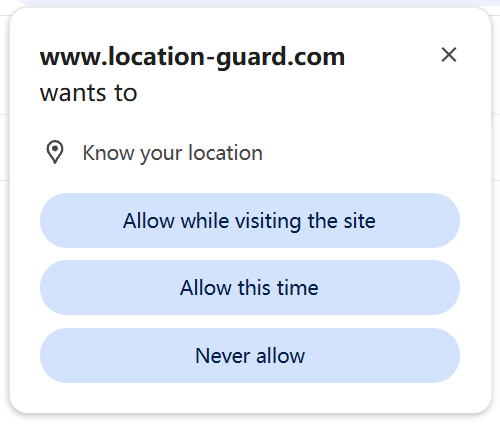
Browser geolocation can be much more precise than IP-based location, but it requires permission. When a website requests browser geolocation, your browser shows a popup asking whether you want to allow location access.
If you click "Allow," your browser and operating system may use available signals such as GPS, nearby Wi-Fi networks, nearby Bluetooth signals, and IP-based data to estimate your position. The website usually receives the final browser-reported coordinates and an accuracy estimate, not the raw Wi-Fi or Bluetooth list.
Browser geolocation can be very precise on some devices, especially phones or laptops with strong location services. On other devices, it may be broad or inaccurate. The exact accuracy depends on your device, operating system, browser, network, and permission settings.
If you click "Deny," the website does not receive browser geolocation coordinates from that request. It may still estimate a broader location through your IP address.
What websites can receive through browser geolocation when permission is allowed:
- Latitude and longitude
- An accuracy estimate
- Altitude or speed on some devices and browsers
Method 3: Wi-Fi and Nearby Network Signals
Wi-Fi and nearby network signals can help your device estimate location more accurately. This is usually part of browser or device geolocation, not a separate signal that ordinary websites read directly without permission.
Location services may compare nearby Wi-Fi network identifiers with location databases maintained by platform or location providers. Your device can detect nearby networks even if it is not connected to them, but websites usually receive the final location result from the browser rather than the raw list of nearby networks.
This is why browser geolocation can sometimes be more accurate than IP address location alone. It can combine multiple signals into one reported position.
How Accurate Is Each Method?
| Method | Typical accuracy | Requires browser location permission? |
|---|---|---|
| IP address | Country, region, city, ISP location, or nearby area | No browser geolocation permission |
| Browser geolocation | Can be precise, but varies by device and signal quality | Yes |
| Wi-Fi and nearby network signals | Can improve browser/device location estimates | Usually through browser/device location permission |
In general, methods that use browser or device location permission can be more precise. IP-based location is often available when you connect to a website, but it is usually broader and less reliable.
Why Do Websites Want Your Location?
Websites use location for many different reasons.
- Local content: News websites show local stories, weather sites show local forecasts, and restaurant websites show nearby locations.
- Advertising: Advertising networks use location to show ads from local businesses and to understand broad visitor patterns.
- Location-based pricing or availability: Some shopping and travel sites may show different offers, shipping options, or availability depending on region.
- Regional availability: Some services provide different content or features in different countries or regions.
- Analytics: Websites collect broad location data to understand where visitors come from.
How to Stop Websites From Knowing Your Location
Now that you understand how websites estimate your location, here is what you can do about each signal.
To manage browser geolocation
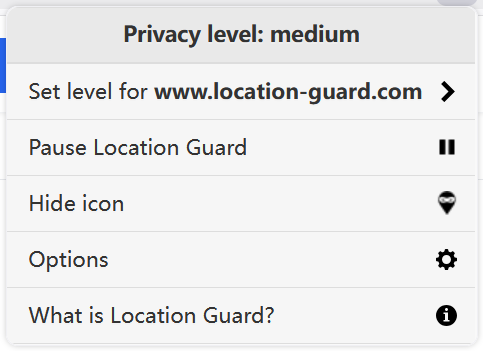
Refusing permission when websites ask can help. If you want a website to receive a location result without exposing your precise browser location, you can use a browser extension that reports an adjusted or configured browser location.
We recommend:
- Location Guard for Firefox, Edge and Opera 鈥?adds controlled noise to reduce exposure of precise coordinates.
- Change Geolocation for Chrome 鈥?lets you set coordinates for browser geolocation testing and privacy control.
You can find both options on our download page.
To manage IP address location
To reduce IP-based location exposure, you need a network privacy tool such as a VPN. A VPN routes your connection through another network, so websites see the VPN server's IP address instead of your normal one.
To check what websites can currently see
Use our free check my location tool. It shows the browser geolocation result returned by your browser. The test takes about one minute.
Common Questions
Can websites see my location without asking?
Yes, through IP-based location. This does not require browser geolocation permission. For browser geolocation, websites must request permission first unless you have already saved a permission choice for that site.
Is IP address location always correct?
No. It may show the city where your internet provider's server or network is located, which can be different from where you actually are. It is often useful for country or region, but it is not guaranteed to be precise.
Can a website track my location over time?
Through IP address, yes. Your IP address is sent to every website you visit automatically. Advertising networks can use this to build a record of which websites you visit. Browser geolocation requires your permission each time, but if you've given permanent permission to a website, it can request your location whenever you visit.
Does private browsing or incognito mode hide my location?
No. Private browsing does not change your IP address, and it does not automatically block browser geolocation. It mainly prevents your browser from saving browsing history locally. Websites may still estimate location from your IP address or request browser geolocation.
If I use Location Guard, will websites still know roughly where I am?
It depends on the privacy level you choose. With a higher privacy level, your reported browser location may be farther from your real position. With a lower privacy level, it may remain closer to your general area. You can also set a fixed location if you want the browser to report configured coordinates.
Summary
Websites can estimate your location through IP address data, browser geolocation permission, and nearby network signals used by your device's location services.
IP address location is often available without browser geolocation permission, but it is usually broad. Browser geolocation can be more precise, but it requires permission. Wi-Fi and nearby network signals usually help improve browser or device location estimates rather than being shown directly to ordinary websites.
To reduce location exposure, use browser permission settings, a browser location tool such as Location Guard, and a VPN if you also want to reduce IP-based location exposure.
If you want to see what your browser currently reports, use our free My Location tool.